How the laser in your phone turns empty rooms into precise digital models.
LiDAR stands for Light Detection and Ranging. It's a technology that measures distance by firing pulses of laser light and calculating how long each pulse takes to bounce back from a surface. If that sounds like sonar but with light instead of sound, that's basically what it is.
The concept has been around for decades. Surveyors use LiDAR to map terrain. Self-driving cars use it to detect obstacles. Archaeologists use it to find hidden structures under forest canopies. NASA uses it to measure the distance to the moon. It's one of those technologies that quietly underpins a huge amount of modern science and engineering.
In 2020, Apple put a LiDAR scanner on the iPad Pro. A few months later, it appeared on the iPhone 12 Pro. Suddenly, a technology that previously required equipment costing thousands of dollars was sitting in people's pockets. The scanner on your iPhone or iPad fires thousands of infrared laser pulses per second, creating a detailed depth map of everything in front of it.
For room scanning, this is transformative. Instead of estimating distances from camera images -- which is fundamentally a guess, no matter how sophisticated the algorithm -- LiDAR physically measures the distance to every surface it can see. That's the difference between inferring and knowing.
Apple's LiDAR scanner uses a direct time-of-flight (dToF) sensor. Here's what happens when you point your iPhone at a wall:
The scanner emits infrared laser pulses. These are invisible to the human eye -- you won't see any red dots or laser beams. The scanner sends out thousands of pulses in a grid pattern, covering the field of view in front of the device.
Each pulse bounces off a surface and returns to the sensor. The sensor measures the exact time between sending the pulse and receiving the return. Since we know the speed of light, the round-trip time tells us the precise distance to that surface.
The device builds a depth map. With thousands of distance measurements per second, the scanner creates a real-time three-dimensional point cloud of the environment. Each point represents a specific location in space where a surface was detected.
Software interprets the point cloud. This is where apps like ezSpace come in. The raw point cloud data gets processed to identify walls, floors, ceilings, corners, doorways, and other architectural features. The result is a structured model of the room, complete with measurements.
The whole process happens continuously and in real time. As you move your device through a room, the LiDAR scanner is constantly firing, measuring, and mapping. The depth data gets fused with information from the camera and motion sensors to build an increasingly complete picture of the space.
Not all room scanning apps use LiDAR. Many rely entirely on the camera to estimate room geometry. The difference in approach leads to real differences in results.
How camera-based scanning works: These apps take photos or video of a room and use computer vision algorithms to estimate the positions of walls and surfaces. Some use photogrammetry -- analyzing multiple images from different angles to triangulate positions. Others use machine learning to identify architectural features and guess at distances. The keyword in both cases is "estimate."
How LiDAR scanning works: The scanner physically measures the distance to surfaces using laser time-of-flight. There's no estimation, no triangulation, no machine learning guesswork. Each measurement is a direct physical reading of distance.
This difference matters in several practical ways:
Accuracy. LiDAR measurements are based on the speed of light, which is a known constant. Camera-based estimates depend on image quality, lighting conditions, lens distortion, and the quality of the estimation algorithm. LiDAR wins on raw accuracy, consistently.
Lighting conditions. Camera-based scanning needs decent lighting to produce good images. In a dim room, the camera struggles, and the measurements suffer. LiDAR generates its own light (infrared laser pulses), so it works just as well in a dark basement as in a sunlit living room. If you're scanning a room with LiDAR, ambient lighting is almost irrelevant to measurement quality.
Speed. LiDAR captures depth data continuously and instantly. Camera-based approaches often need you to take multiple photos, sometimes from specific angles, and then wait for processing. A LiDAR room scanner app like ezSpace can capture a room in 60 seconds because the depth data arrives in real time.
Textureless surfaces. Camera-based scanning relies on visual features in the image to identify surfaces. A blank white wall with no texture, shadows, or markings is a nightmare for computer vision -- there's nothing for the algorithm to latch onto. LiDAR doesn't care what a surface looks like. It measures distance based on reflected laser light, so a featureless white wall is just as easy to measure as a brick wall covered in posters.
The tradeoff: LiDAR scanning requires a device with a LiDAR sensor, which limits it to iPhone Pro and iPad Pro models. Camera-based scanning works on any device with a camera. If you don't have a LiDAR-equipped device, camera-based apps are your best option. But if you do have LiDAR, using a camera-based scanner instead is like choosing to estimate when you could measure.
Apple's LiDAR scanner is currently available on Pro-tier devices only. Here's the complete list:
iPhone Pro models:
iPad Pro models:
Standard iPhone models (iPhone 12, 13, 14, 15, 16 -- the non-Pro versions), iPhone SE, iPad Air, standard iPad, and iPad mini do not have LiDAR scanners. The LiDAR sensor is the small, dark circular element near the rear camera array. If you see it on the back of your device, you're good to go.
It's worth noting that while both iPhone Pro and iPad Pro have the same LiDAR hardware, the iPad Pro's larger screen makes it more comfortable for viewing scan results in real time. The scanning quality is identical between them.
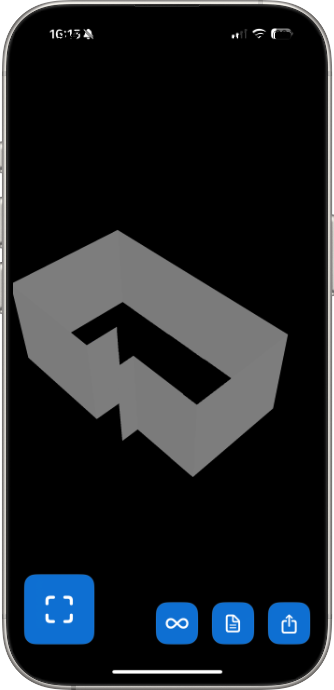
The LiDAR scanner provides the raw depth data. ezSpace is the app that turns that data into something useful.
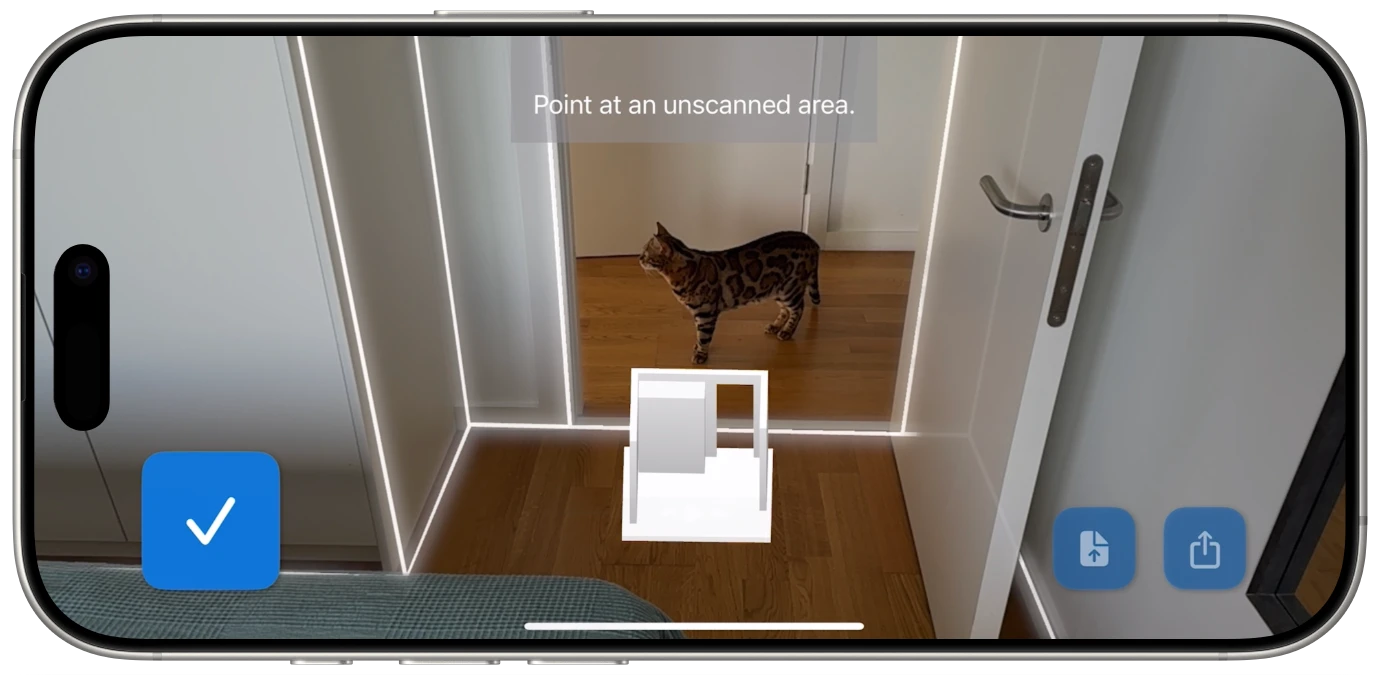
When you scan a room with ezSpace, the app processes the incoming LiDAR data in real time. It identifies walls, calculates their angles relative to each other, detects corners where walls meet, and locates openings like doorways. The live visual feedback on your screen shows this process as it happens -- you can watch walls being outlined and boundaries being defined as you walk through the space.
Once the scan is complete, ezSpace generates a structured room model from the processed LiDAR data. This model contains:
Wall positions and dimensions. The exact location and length of every wall segment, including angles where walls meet at something other than 90 degrees.
Room boundaries. The complete perimeter of the room, accounting for alcoves, closets, bay windows, and other irregular features that LiDAR captures naturally.
Three-dimensional geometry. The full 3D shape of the room, not just the 2D floor plan view. This is what enables the USDZ and OBJ exports for AR and 3D applications.
From this structured model, ezSpace can generate any of its six export formats. A LiDAR scan to PDF floor plan extracts the 2D plan view with measurements. A LiDAR scan to OBJ exports the full 3D mesh. A LiDAR scan to AutoCAD-compatible SVG provides vector geometry that can be imported into professional CAD software. Each export is simply a different representation of the same underlying scan data.
This architecture means you only need to scan a room once. The JSON export preserves the complete room model, so you can reopen it in ezSpace later and export to any format without rescanning. Measured a room as a quick PDF last month? Open the JSON and export an OBJ now. The data is the same; only the output changes.
LiDAR room scanning isn't just a technical novelty. It changes the economics and accessibility of spatial measurement in ways that affect real workflows.
It democratizes accurate measurement. Before LiDAR phones, getting precise room measurements quickly required professional equipment -- laser distance meters, total stations, or hiring a surveyor. Now, anyone with an iPhone Pro can capture a measured floor plan in a minute. That's not a marginal improvement; it's a different category of accessibility.
It enables workflows that weren't practical before. When accurate room measurement takes 30 seconds instead of 30 minutes, you use it in situations where you never would have bothered before. Quick furniture check at the store? Scan the room. Comparing two apartments during a single afternoon of viewings? Scan both. Documenting every room in a property for insurance? Walk through the whole place in 15 minutes.
It creates data, not just measurements. A tape measure gives you numbers. A LiDAR scan gives you a digital model that can be exported, shared, imported into other software, viewed in AR, and reprocessed into different formats. The measurement is just the beginning -- the digital capture is the real product.
It bridges physical and digital spaces. Interior designers, architects, game developers, filmmakers, and AR creators all need digital representations of physical spaces. LiDAR 3D room capture with an iPhone or iPad creates that bridge without expensive scanning rigs or lengthy photogrammetry sessions.
For a deeper look at how to use LiDAR scans in 3D applications and augmented reality, see the 3D room scan guide. For details on each export format, check the export formats page.

Is the LiDAR laser safe? Yes. Apple's LiDAR scanner uses Class 1 infrared laser pulses, which are eye-safe under all conditions of normal use. You can't see the laser (it's infrared), and it operates at power levels well below the threshold for any biological effect. It's the same safety classification as the infrared sensors in TV remotes.
Does LiDAR scanning drain my battery? The LiDAR scanner does use some additional power, but a single room scan takes about 60 seconds. That's not enough to meaningfully impact your battery. If you're scanning an entire property with dozens of rooms, you might notice more drain, but it's not dramatic. The iPad Pro's larger battery makes it better suited for extended scanning sessions.
Can LiDAR scan through glass? Not reliably. Infrared laser pulses can pass through, reflect off, or scatter when they hit glass surfaces. Windows, mirrors, and glass doors may show up as gaps or inaccurate surfaces in a LiDAR scan. This is a fundamental limitation of the technology, not specific to any app.
Does it work outdoors? Apple's LiDAR scanner has a range of about 5 meters (roughly 16 feet), which is optimized for indoor spaces. Outdoor use is limited by this range and by the fact that direct sunlight contains infrared light that can interfere with the scanner's pulses. ezSpace is designed for indoor room scanning.
How does LiDAR handle furniture? The scanner measures whatever surfaces it can see, including furniture. ezSpace's algorithms are designed to identify architectural features (walls, floors, ceilings) and distinguish them from furnishings, but scanning an empty or lightly furnished room will generally produce the cleanest results.
What about really large rooms? The LiDAR scanner's effective range is about 5 meters, so in very large rooms, you may need to walk closer to distant walls to ensure they're captured. For most residential and typical commercial rooms, this isn't an issue. For warehouse-sized spaces, you'd want to walk the perimeter rather than scanning from the center.
Put that LiDAR scanner to work. Your rooms are waiting to be measured.