Capture any room in three dimensions. View it in AR. Export it to everything.
Floor plans are useful. Nobody's arguing otherwise. But a floor plan is a top-down, two-dimensional simplification of a three-dimensional space. It tells you that a room is 12 feet by 15 feet, but it doesn't show you the ceiling height, the window placement, or how the space actually feels when you're standing in it.
A 3D room scan captures the full spatial geometry of a room -- walls, ceiling, floor, and everything in between. Instead of reducing a room to a flat diagram, it preserves the space as it actually exists. The result is a three-dimensional digital model you can rotate, view from any angle, and even walk through in augmented reality.
ezSpace captures 3D room data using the LiDAR scanner on your iPhone Pro or iPad Pro. Every scan is inherently three-dimensional -- the LiDAR sensor measures depth from your device to every visible surface, building a complete 3D point cloud as you walk through the room. The 2D floor plan is actually generated from this 3D data, not the other way around.
This means that when you scan a room with ezSpace, you're not choosing between a floor plan and a 3D model. You're getting both. The same scan that produces a clean PDF floor plan can also export a full 3D room model in USDZ, OBJ, or Reality format. Scan once, export everything.
ezSpace exports 3D room scans in three formats, each designed for a different ecosystem and use case.

Apple's AR format. Open a USDZ file on any iPhone or iPad and the room appears as an augmented reality model you can place on a table, walk around, and view from any angle. No special app needed -- iOS handles it natively.

The universal 3D format. Wavefront OBJ files import into virtually every 3D application on the market -- Blender, SketchUp, AutoCAD, Maya, 3ds Max, Cinema 4D, and dozens more. If your workflow involves 3D software, OBJ is your bridge.

Apple's RealityKit format. Reality files are designed for developers building AR experiences on Apple platforms. Import them into Reality Composer to adjust materials, lighting, and animations for custom AR applications.
The USDZ export from ezSpace turns your room scan into an augmented reality model that you can view directly on any Apple device. This isn't a gimmick -- it's genuinely useful in ways that might not be immediately obvious.
Visualize furniture placement. Place the AR room model on your desk or table, then mentally position furniture within it. Seeing the room in 3D, from above or from any angle, makes spatial decisions much more intuitive than staring at a flat floor plan. You can rotate the model, zoom in on specific areas, and get a feel for how the space works in three dimensions.
Share spaces remotely. Trying to describe a room to someone who hasn't seen it? Send them the USDZ file. They can open it on their iPhone or iPad and explore the room in AR, getting a much better sense of the space than any photos or measurements could convey. It's the next best thing to being there.
Review before renovating. When you're planning changes to a room, having a 3D model to reference helps you think through the project more thoroughly. How will removing that wall affect the sight lines? Where exactly would the new doorway go? An AR room model lets you examine these questions from every angle.
Document spaces over time. Scan a room before renovation and after. Scan an apartment when you move in and when you move out. Having 3D snapshots of a space at different points in time creates a record that flat photos can't match.
The AR viewing experience is built into iOS -- you don't need any special AR viewer app. Just open the USDZ file and iOS presents the 3D model in your camera view, anchored to a real surface. You can walk around it, pinch to resize, and tap to reposition. Apple's augmented reality room scan viewer handles all of this natively.
The OBJ export is where a 3D room scan on your iPhone meets the professional 3D world. Wavefront OBJ is the closest thing to a universal language in 3D graphics, and virtually every application that works with 3D geometry can import it.
Interior design and architecture. Import a room's 3D model into SketchUp, AutoCAD, or Revit as a starting point for design work. Instead of manually building the room geometry from measurements, you start with an accurate 3D shell captured from the physical space. Add furniture models, experiment with layouts, and develop designs within the context of the real room.
3D rendering and visualization. Drop the OBJ into Blender, Cinema 4D, or 3ds Max to create photorealistic renders of a space. Add materials, lighting, and furnishings to produce visualizations that show what a room could look like after a redesign. Real estate staging, renovation proposals, and design pitches all benefit from renders based on actual room geometry rather than approximations.
Game development and virtual environments. A scanned room can serve as the foundation for a virtual environment in Unity or Unreal Engine. While the raw scan may need cleanup and optimization for real-time rendering, starting with accurate room geometry from a physical space is far easier than building it from scratch.
3D printing. Want a physical scale model of a room? Export the OBJ, clean it up in your slicer software, scale it down, and print it. Architects and designers sometimes use physical models to communicate spatial ideas, and a 3D room scan from a phone gives you the starting geometry in minutes rather than hours.
The point isn't that ezSpace replaces professional 3D tools. It's that ezSpace captures the real-world data that those tools need as input. The 60-second room scan replaces what might otherwise be hours of manual modeling to recreate a room's geometry in software.
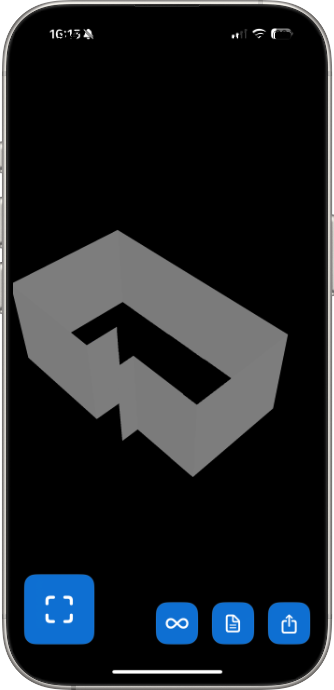
If you're building AR experiences for Apple platforms, the .reality export speaks your language.
Reality files are designed for Apple's RealityKit framework and Reality Composer application. They're the native format for building augmented reality experiences on iOS, iPadOS, macOS, and visionOS. When you export a room scan as a .reality file from ezSpace, you get a package that's ready to import into Apple's AR development tools.
In Reality Composer, you can take the scanned room geometry and add behaviors, animations, audio triggers, and material adjustments. Want the lights in the scanned room to change color when a user taps? Want to attach informational labels to specific walls? Want to create an AR walkthrough experience? The .reality file gives you the spatial foundation to build on.
For developers working on apps that need to reference real physical spaces -- property management apps, home improvement tools, interior design platforms, real estate apps -- the ability to quickly capture a room and export it in a format that integrates directly into their development pipeline is a significant time saver.
The .reality format also preserves spatial relationships and scale, so the AR model accurately represents the physical room. When someone views your AR experience, the proportions and dimensions match reality. That matters when you're building tools that people will use to make real-world decisions.
3D room captures extend well beyond the obvious architectural applications. Here's who's using them and why.
Interior designers. Capturing the 3D geometry of a client's space is the first step in any design project. A 3D room scan from an iPhone replaces hours of manual measurement and CAD modeling with a 60-second walk-through. Import the OBJ into your design software and start placing furniture, materials, and lighting immediately.
Real estate agents and staging professionals. 3D models of properties are increasingly expected in high-end real estate marketing. Virtual tours, AR previews, and rendered visualizations all start with a 3D capture of the space. ezSpace makes this accessible without specialized equipment or technical expertise.
Renovation contractors. A 3D model of a room before renovation begins serves as both a reference and a communication tool. Show clients exactly what the space looks like now, then present your proposed changes in the same 3D context. The before-and-after becomes much more compelling in three dimensions.
Film and photography scouts. When scouting locations, having a 3D model of a space lets the director, cinematographer, and production designer plan shots and setups before the crew arrives. A quick 3D room scan on an iPhone during a scout visit provides a reference that's far more useful than photos alone.
Insurance and documentation. A 3D scan of a room captures more detail than photos or measurements alone. For insurance documentation, estate inventories, or property records, a 3D model provides a comprehensive spatial record that can be referenced later from any angle.
AR developers and enthusiasts. Whether you're building an AR app professionally or just exploring what's possible with augmented reality, having easy access to 3D models of real spaces is invaluable. The USDZ and Reality exports from ezSpace feed directly into AR development workflows.
Educators and students. Architecture students, interior design students, and anyone studying spatial design can use 3D room scans as study materials and project starting points. Scanning a building's rooms provides real-world geometry to work with -- much more engaging than hypothetical floor plans from a textbook.
For a complete overview of all six export formats (including the 2D options), see the export formats guide. To understand the scanning technology behind it all, check out how LiDAR room scanning works.
Your rooms exist in three dimensions. Time to scan them that way.