Create floor plans in 60 seconds. No graph paper. No protractor. No regrets.
Let's be honest about what creating a floor plan used to involve. At best, it meant graph paper, a tape measure, a pencil, and an hour of your afternoon. At worst, it meant hiring a drafter, waiting a week, and paying a few hundred dollars for what amounts to a bird's-eye drawing of your apartment.
The do-it-yourself approach was always an exercise in patience. Measure every wall. Write the numbers down. Measure the doorways and windows. Write those down too. Then try to draw everything to scale on grid paper while your brain does the spatial math of converting feet to little squares. Inevitably, something doesn't line up, and you either fudge it or start over.
Online floor plan makers improved things a bit. Drag-and-drop interfaces let you build floor plans on a computer, room by room, wall by wall. But you still needed all the measurements first, and you still had to manually construct the layout. It was faster than graph paper, sure, but it was still manual drafting with extra steps.
What everyone actually wanted was simple: point at a room, and get a floor plan. That's what ezSpace does.
ezSpace is a floor plan app for iPhone and iPad that uses your device's built-in LiDAR scanner to create measured floor plans almost instantly. The process is absurdly simple:
Open the app. Tap Scan. Walk around the room. Tap Done.
That's the whole workflow. In about 60 seconds, ezSpace captures the geometry of the room -- every wall, corner, doorway, and surface -- and generates a clean, measured floor plan. No manual measuring. No manual drawing. No trying to remember if the hallway is 3 feet wide or 4 feet wide.
The app provides real-time visual feedback during the scan, so you can see walls and boundaries being identified as you walk. When the outline is complete, you know you're done. It's the kind of instant floor plan generator that feels like it shouldn't be possible from a phone, and yet here we are.
Once the scan is complete, you can export your floor plan immediately. Need a PDF to print or email? Done. Need a vector SVG for a presentation? Done. Need a 3D model? Also done. Every scan can be exported to six different formats, so you get exactly the output you need for whatever comes next.

The PDF export is the one most people reach for first, and for good reason. It produces a clean, print-ready floor plan with precise measurements labeled on every wall.
The output isn't some rough sketch with approximate numbers. It's a properly formatted floor plan diagram that looks like something a professional would produce. Wall thicknesses are represented. Measurements are clearly labeled in the units you've selected. The layout is clean and uncluttered, designed to be immediately readable whether you're viewing it on a screen or printing it on paper.
This matters more than you'd think. When you email a floor plan to a contractor, a real estate agent, or a furniture store, the quality of that document says something about the quality of the measurements. A clean PDF floor plan communicates "I measured this properly" in a way that a photo of graph paper scribbles never will.
The PDF floor plan generator in ezSpace uses the same scan data as all the other exports. You're not losing any accuracy by choosing the simpler format. You're just getting the data presented in the most universally accessible way possible. Everyone can open a PDF. Everyone can print a PDF. That's the point.

Floor plans aren't just for architects. The list of situations where having a floor plan makes life easier is surprisingly long.
Buying or renting a new place. You found the apartment. You love the apartment. But will your furniture fit? Without a floor plan, you're guessing. With one, you can plan your layout before you sign the lease. A floor plan app on your iPhone means you can scan the place during the viewing and make decisions with actual data instead of vibes.
Selling a home. Real estate listings with floor plans get more engagement than those without. Buyers want to understand the layout before they schedule a showing. A quick scan of each room gives you a complete set of floor plans for the listing -- and the PDF export makes them easy to upload to any platform.
Planning a renovation. Contractors need room dimensions before they can give you an accurate quote. Scanning the rooms that need work takes a few minutes and gives you a professional floor plan to share with every contractor who comes to bid. No more re-measuring the kitchen for the third time because the third plumber wants the numbers in a different format.
Interior design projects. Whether you're hiring a designer or doing it yourself, a floor plan is the starting document for every design decision. Furniture placement, traffic flow, lighting plans -- everything starts with knowing the exact dimensions and layout of the room.
Insurance documentation. After a loss event, having documented floor plans of your property can expedite the claims process significantly. A digital floor plan created with a mobile floor plan app provides timestamped, measured documentation that's hard to argue with.
Event and venue planning. Setting up tables, stages, booths, or displays? A floor plan lets you plan the layout in advance and communicate it clearly to everyone involved.
Just settling the question. Sometimes you just need to know how big a room is. Maybe you're comparing apartments. Maybe you're figuring out if you have enough space for a home gym. Maybe you want to calculate square footage for an accurate listing. A floor plan gives you the answer in a minute.
Speed matters. When you're standing in a room and you need a floor plan, you want it now -- not in 20 minutes, not tomorrow, not after you upload photos to some cloud service and wait for processing.
Here's how the main approaches to creating floor plans stack up in terms of time:
Manual measurement + graph paper: 30-60 minutes per room, depending on complexity and how many times you drop the tape measure. Requires a second person for long walls. Output quality depends entirely on your drawing skills.
Manual measurement + desktop floor plan software: 20-40 minutes. You still need to measure everything by hand, then spend additional time building the floor plan in software. Produces clean output, but the process is slow.
Photo-based floor plan apps: 5-15 minutes. These apps use your camera to estimate room geometry. Faster than manual methods, but accuracy varies widely. Many require you to identify corners manually or draw over photos. Results can be hit-or-miss.
LiDAR floor plan with ezSpace: About 60 seconds. Walk around the room. Tap Done. Export. The floor plan is generated automatically from precise laser measurements, with no manual input required beyond the initial scan. It's not just faster -- it's a fundamentally different workflow.
The speed difference changes how you use floor plans. When creating one takes an hour, you only make floor plans when you absolutely have to. When it takes a minute, you make them anytime they'd be useful. And it turns out, they're useful a lot more often than you'd think.
ezSpace starts with floor plans, but it doesn't stop there. Every scan captures the full three-dimensional geometry of the room, which means you're not limited to flat 2D diagrams.
The SVG export gives you vector floor plans that scale infinitely without losing sharpness. Perfect for architects and designers who need to incorporate room measurements into larger documents or presentations.
The USDZ export creates an AR-ready 3D model that you can view in augmented reality on any Apple device. Walk around a virtual version of the room right there on your table. It's genuinely useful for visualizing furniture placement and design changes.
The OBJ export provides a standard 3D mesh file that imports directly into Blender, SketchUp, AutoCAD, and virtually any other 3D software. If your workflow involves 3D modeling, this is the export that bridges the gap between a physical room and your digital workspace.
And if you work with code or custom tools, the JSON export gives you raw room geometry data that you can plug into scripts, databases, or custom applications.
Most floor plan creator apps give you one output format and call it a day. ezSpace gives you six, because different people need room data in different forms, and there's no reason to force everyone through the same keyhole.
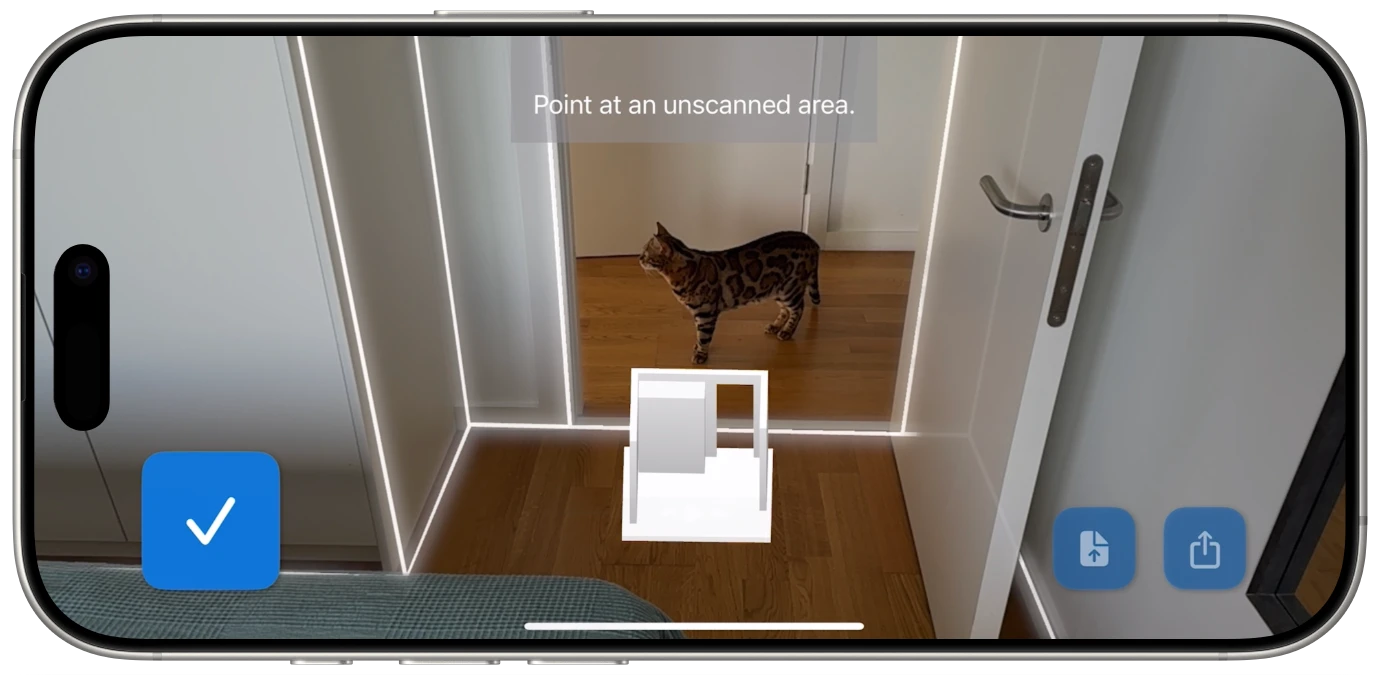
ezSpace is a floor plan app for iPhone and iPad, but it requires a device with Apple's LiDAR scanner. That means:
iPhone: iPhone 12 Pro, 13 Pro, 14 Pro, 15 Pro, or 16 Pro (including Pro Max variants). Standard iPhone models don't have LiDAR.
iPad: iPad Pro 11-inch (4th generation and later) or iPad Pro 12.9-inch (4th generation and later), including the M4 iPad Pro models from 2024. iPad Air, standard iPad, and iPad mini don't have LiDAR.
If you have a compatible device, that's all you need. Download ezSpace from the App Store, open it, and start scanning. There's no account creation, no mandatory tutorial, and no paywall between you and your first floor plan. Available in 23 languages, so it works wherever you are.
For a deeper look at the technology behind the scanning, see how LiDAR room scanning works. Or if you want to explore the full range of export options, check out the export formats guide.
Your rooms have been waiting for someone to finally draw them properly.