You looked up. You wondered. Now you can find out.
You're standing in the backyard. Maybe you're grilling, or walking the dog, or just enjoying five minutes of quiet. Then you hear it. That distant rumble. You look up, and there it is: a plane, carving a white line across the sky. And without even meaning to, you wonder. Where is it going? Where did it come from? How high is it? Is that a commercial flight or something else?
This is one of the most common idle curiosities human beings share. Millions of people Google "what plane is flying over me" every month. It's a question that doesn't feel urgent enough to sit down and research, but interesting enough that you'd love an instant answer while you're still looking at the thing.
Until recently, the best you could do was open a flight tracking website, stare at a map covered in little airplane icons, and try to figure out which one of those icons corresponded to the actual plane above your head. It works, but it's not exactly satisfying. By the time you've zoomed in and cross referenced the map position with the direction you think the plane is heading, it might already be out of sight.
Plane and Simple takes a completely different approach. Instead of looking at a map on your screen while squinting at the sky, you point your phone directly at the plane. The app uses your camera and augmented reality to overlay flight data right there in your view, floating next to the aircraft you're actually looking at. No map. No guessing. Just point and know.
Open the app, hold up your iPhone or iPad, and point it at the sky. That's the whole process.
Behind the scenes, Plane and Simple pulls live flight data from the OpenSky Network, which tracks aircraft positions across the globe using a network of receivers. The app knows your location and fetches data for every aircraft within a 60 kilometer radius. Then, using Apple's ARKit technology, it positions that data in 3D space so each flight's information card appears near the actual plane in your camera view.
You don't need to tap anything, search for a flight number, or select an aircraft from a list. The data just appears, floating in the sky right where it belongs. Move your phone to look at a different part of the sky, and you'll see the data for whatever planes are in that direction. It's genuinely as simple as pointing your camera at a plane and reading what shows up.
The AR overlay stays locked in position as you move your device, so the information cards track with the actual aircraft rather than sliding around your screen. It feels less like using an app and more like your eyes suddenly gained the ability to read aviation data.
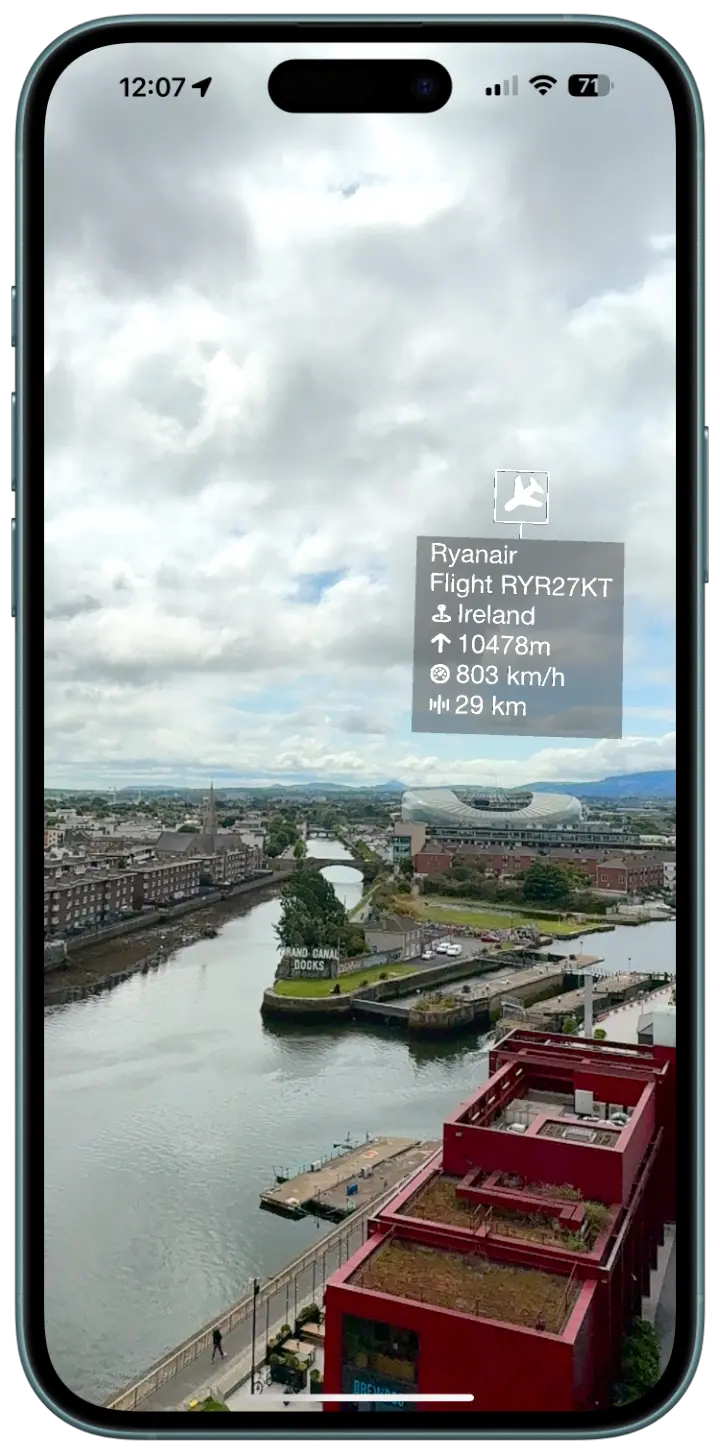
Each aircraft gets an information card that floats in AR near its position. Here's what Plane and Simple shows you for every flight it detects:
Call sign. This is the identifier the aircraft is broadcasting, which typically corresponds to the flight number. If you see "UAL452," that's United Airlines flight 452. If you see "N172SP," that's a private aircraft registration. Military flights often show up with their own distinct call signs. The call sign alone answers the basic question of what plane is above you.
Origin country. Where the aircraft is registered. This doesn't necessarily tell you where it departed from, but it tells you something about the airline or operator. A plane with a German registration is likely Lufthansa or Condor. A UK registration might be British Airways or easyJet.
Altitude. How high the plane is flying, which tells you more than you might think. A commercial jet at 35,000 feet is probably mid cruise on a long route. The same jet at 8,000 feet is either climbing out of a nearby airport or descending toward one. A small aircraft at 3,000 feet might be a local training flight or a private pilot on a short hop.
Speed. Ground speed gives you a sense of the aircraft type and phase of flight. A jet at 500 knots is cruising. A turboprop at 250 knots is doing its thing. A small plane at 90 knots is probably a Cessna doing circuits at a local airfield.
Distance. How far the aircraft is from your position, calculated in real time. This is surprisingly fun to know. That plane that looks like it's directly overhead might actually be 30 kilometers away and much higher than you'd guess.
Identifying overhead planes sounds like a niche hobby until you realize how many situations make you curious about what's flying above you.
Backyard plane spotting. This is the classic scenario. You're outside, a plane goes over, and you want to know what it is. With Plane and Simple, you hold up your phone and the answer is right there. No switching between your camera and a map app. No trying to match a dot on a screen with a plane in the sky. If you live near a flight path, this becomes genuinely addictive. You start noticing patterns. The 6:15pm arrival. The cargo flights that come through late at night. The occasional military transport that makes you do a double take.
Near an airport. Airports are plane spotting paradise. Sit at a cafe near the approach path and you'll see a steady stream of aircraft coming in, each one identified in real time on your screen. You'll learn which airlines serve your local airport, what routes they fly, and how the approach patterns change with the wind. Some people spend entire afternoons doing this. We get it.
Road trips and travel. You're driving through the middle of nowhere (well, someone else is driving) and a plane passes overhead. Out here, with no major airport nearby, that plane becomes more intriguing. Is it a cross country flight? A private jet? A regional turboprop connecting two small cities? The answer is one phone raise away.
Teaching kids about aviation. Children ask a lot of questions about planes, and most of them are exactly the questions Plane and Simple answers. Where is it going? How fast is it flying? How high up is it? Pointing a phone at the sky and seeing the answers appear in real time is a much better learning experience than saying "I'm not sure, probably far away."
Settling debates. "That's definitely a 747." "No way, that's an A380." Plane and Simple won't identify the aircraft type directly, but the call sign and airline information will tell you who's operating the flight, and a quick search from there will confirm whether your friend owes you a beverage.
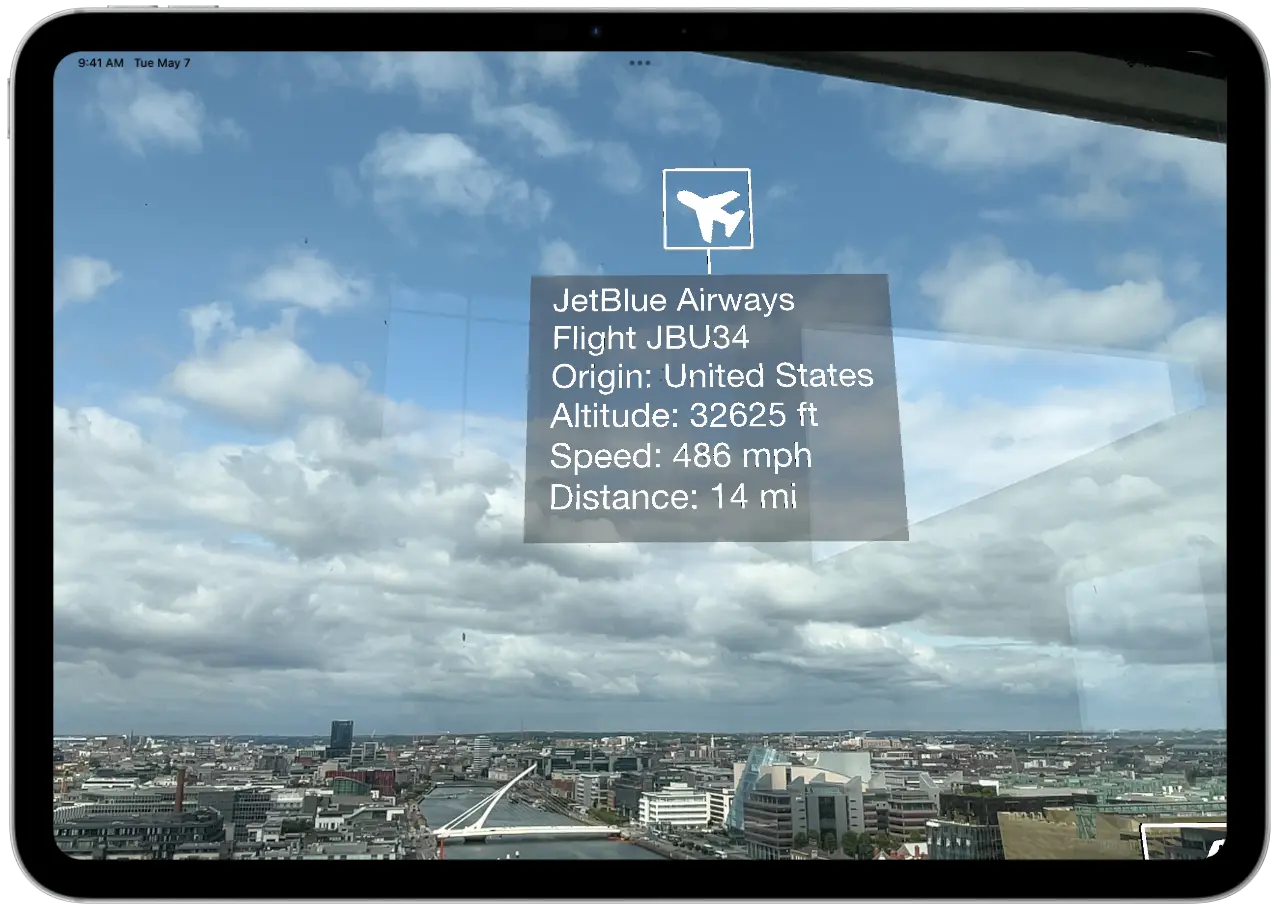
Traditional flight tracking apps and websites are excellent tools. Flightradar24, FlightAware, ADS B Exchange, and others give you a wealth of aviation data. But they were designed around a different use case.
Those apps answer the question "What flights are in this region?" by showing you a map. When your actual question is "What is that specific plane above me right now?", a map creates a translation problem. You have to look at the sky, identify the plane's approximate direction and position, then look at the map and find the corresponding icon. If there are multiple flights in the area, this matching exercise becomes genuinely tricky. Planes at different altitudes can appear close together from the ground, and the perspective difference between looking straight up and looking at a flat map makes the comparison unintuitive.
AR eliminates this translation entirely. There is no map. There is no matching exercise. You look at a plane, the phone sees the same plane in the same part of the sky, and the data appears right there. The connection between the physical aircraft and its information is immediate and unambiguous.
This is not to say you should delete your existing flight tracker. Map based trackers are still better for monitoring a specific flight you're waiting for, checking departure and arrival times, or exploring aviation traffic in areas you can't physically see. But for the specific, visceral experience of looking up and wanting to know what that plane is, nothing competes with pointing your camera at it and reading the answer off the sky.
Plane and Simple tracks every aircraft within 60 kilometers of your location. That's a surprisingly large area.
To put that in perspective, 60km in every direction gives you a circle of airspace roughly 120 kilometers across. That's enough to cover most major metro areas entirely. If you're standing in central London, you're seeing flights in and out of Heathrow, Gatwick, City, Stansted, and Luton. In the New York area, you'd catch traffic from JFK, LaGuardia, Newark, and Teterboro. Even in less densely served areas, 60km captures the high altitude traffic from commercial jets passing overhead on long routes.
The data covers commercial airlines, private aviation, cargo operators, and military aircraft. If a plane is broadcasting its position (which most aircraft are required to do), Plane and Simple will show it to you. The coverage comes from the OpenSky Network, which aggregates data from volunteer operated receivers worldwide. The result is a remarkably complete picture of the traffic above you at any given moment.
On a busy day near a major airport, you might see dozens of aircraft in your 60km window simultaneously. In rural areas, the sky might be quieter, but the flights you do see tend to be more interesting. That lone plane at 38,000 feet is probably a transatlantic flight, and now you know exactly which one.
Plane and Simple runs on any iPhone or iPad that supports Apple's ARKit framework.
For iPhones, that means iPhone 7 and newer. For iPads, that's iPad 5th generation and newer. If your device was made in 2017 or later, you're almost certainly covered. The app uses your device's camera, motion sensors, and GPS to create the AR experience and position flight data accurately in 3D space.
Unlike some AR apps that require LiDAR hardware, Plane and Simple works with the standard camera and ARKit's motion tracking. This means it runs on a much wider range of devices. You don't need an iPhone Pro or an iPad Pro. Any ARKit compatible iPhone or iPad will do.
The app is free. No subscriptions, no premium tiers, no "pay $4.99 to unlock altitude data." You download it, you open it, you point it at a plane, and you know what it is. That's the whole deal.
There's something quietly wonderful about discovering the hidden traffic above your head.
On any given day, the sky above your house is a highway. Planes are following specific routes at specific altitudes, managed by air traffic control, carrying people to places you might never visit. Some of those planes departed from cities on the other side of the world twelve hours ago. Others took off from an airport twenty minutes away. Each one has a crew, a manifest, a destination, and a story.
Before apps like Plane and Simple, all of that was invisible. You could look up, see a white streak across the blue, and wonder. Now you can look up, raise your phone, and know. The altitude, the speed, the call sign, the country. A tiny window into a vast system that operates above us every single day, mostly unnoticed.
It doesn't change anything about your day, really. Knowing that the plane overhead is Lufthansa flight 401 at 36,000 feet doesn't affect your barbecue or your dog walk. But it satisfies something. That itch of curiosity that made you look up in the first place. And once you start identifying the flights above you, you might find it hard to stop.
Next time someone asks you "What plane is that?", you'll have the answer before they finish the question.
Point your phone at the sky. Get answers.