The technology that turns your phone into a room-measuring machine, explained in plain English.
LiDAR stands for Light Detection and Ranging. It's a technology that measures distances by sending out pulses of light and timing how long they take to bounce back. That's the entire concept in one sentence.
If that sounds straightforward, it's because the core idea genuinely is simple. You send light toward a surface, it reflects back, and you measure the round-trip time. Since light travels at a known, constant speed (about 186,000 miles per second, give or take), that timing measurement converts directly into a distance measurement with a little basic math.
What makes LiDAR powerful isn't the concept -- it's the execution. The LiDAR sensor on your iPhone or iPad fires thousands of these infrared light pulses per second, each aimed in a slightly different direction. Within moments, it has thousands of distance measurements pointing outward in a dense grid pattern. Combine all those measurements together and you get a detailed three-dimensional map of every surface within range.
This technology isn't new. LiDAR has been used for decades in surveying, mapping, autonomous vehicles, atmospheric research, and even archaeology. What is new is having a LiDAR sensor small and affordable enough to fit in a phone. When Apple added LiDAR to the iPad Pro in 2020 and the iPhone 12 Pro later that year, they put professional-grade spatial measurement technology in everyone's pocket.
The LiDAR scanner on iPhone Pro and iPad Pro devices is a small component near the rear cameras. Here's what happens when it activates.
Step 1: It fires infrared light pulses. The LiDAR sensor emits bursts of infrared light -- invisible to human eyes, but perfect for measuring distances. These aren't single beams; the sensor projects a structured pattern of dots across the scene, covering a wide field of view simultaneously.
Step 2: The light hits surfaces and bounces back. Each infrared pulse travels outward until it strikes a surface -- a wall, the floor, a piece of furniture, a doorframe. The light reflects off the surface and returns to the sensor.
Step 3: The sensor measures the return time. For each pulse, the sensor records exactly how long the round trip took. Light travels at about 1 foot per nanosecond, so these timing measurements are incredibly precise. A wall 10 feet away produces a round-trip time of about 20 nanoseconds. The sensor can distinguish these tiny time differences with remarkable accuracy.
Step 4: Timing converts to distance. Using the known speed of light and the measured round-trip time, each pulse translates into a precise distance measurement. Pulse by pulse, the sensor builds up a dense cloud of data points, each one representing a specific location in 3D space.
Step 5: Software assembles the big picture. The raw data from the LiDAR sensor is a collection of thousands of individual distance measurements. Software -- like ezSpace -- takes these data points and assembles them into meaningful geometry: walls, corners, room outlines, and precise dimensions. This is where the magic of room scanning happens. The raw measurements become an organized, measured floor plan.
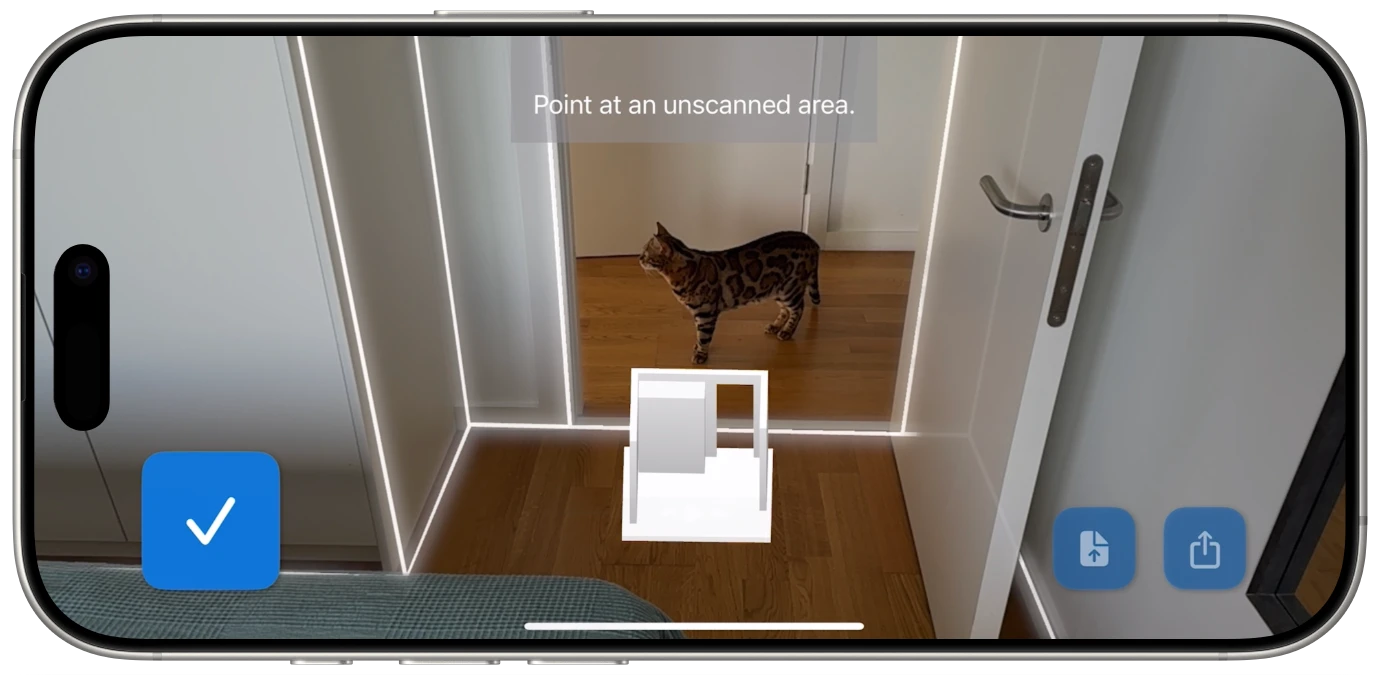
Before LiDAR came to phones, measurement apps had to rely on the camera alone. Understanding the difference explains why LiDAR is so much better for room scanning.
Camera-based measurement uses computer vision algorithms to estimate distances from a regular photo or video feed. The app looks at the visual image and tries to figure out how far away things are based on clues like perspective, known object sizes, edge detection, and motion parallax (how things shift as the camera moves). It's clever engineering, and it works... approximately. But it's fundamentally making educated guesses about depth from a flat 2D image.
The problems with camera-based measurement are predictable. White walls with no visual texture give the algorithms nothing to work with. Dim rooms produce noisy images that confuse the depth estimation. Shiny surfaces create reflections that look like additional depth. Rooms with unusual proportions or minimal furniture lack the visual reference points the algorithms depend on. The result is measurements that can be off by several inches or more -- fine for casual estimates, not reliable enough when accuracy matters.
LiDAR-based measurement works on completely different principles. Instead of analyzing a visual image, it sends out its own light and directly measures the distance to every surface. It doesn't need texture, visual features, or good lighting. It doesn't estimate or guess. It measures.
Here's a comparison of the two approaches:
Accuracy. LiDAR provides substantially more accurate measurements. While camera-based apps might be within 3-6 inches (or worse), LiDAR measurements are typically within 1-2 centimeters of actual distances for room-scale measurements.
Low light performance. LiDAR fires its own infrared light, so it works perfectly in dim conditions. Camera-based apps struggle in low light because the visual image they depend on becomes noisy and unclear. Scanning a basement or evening-lit room is no problem for LiDAR.
Featureless surfaces. A plain white wall is a nightmare for camera-based measurement -- there are no visual features to track. LiDAR doesn't care what the wall looks like. It bounces light off the surface and measures the distance regardless of color, texture, or visual complexity.
Speed. LiDAR captures thousands of measurements simultaneously with each pulse. Camera-based apps often need you to move the phone slowly to build up enough visual data for depth estimation. LiDAR scanning is faster because the sensor is doing the direct measurement work rather than relying on algorithmic inference.
3D capability. LiDAR inherently captures three-dimensional data. Every measurement includes X, Y, and Z coordinates. Camera-based apps can approximate 3D through techniques like photogrammetry, but the results are less precise and require more processing time.
LiDAR isn't on every iPhone or iPad. Apple includes the LiDAR scanner only on Pro-tier devices. Here's the complete list.
iPhone models with LiDAR:
iPad models with LiDAR:
Devices that do NOT have LiDAR: Standard iPhone models (iPhone 12, 13, 14, 15, 16), iPhone Plus models, iPhone mini models, iPad Air (all generations), standard iPad (all generations), iPad mini (all generations), and all iPad Pro models prior to 2020.
How to check your device. If you're not sure whether your device has LiDAR, look at the back near the camera lenses. The LiDAR scanner appears as a small, dark circle -- distinctly separate from the camera lenses. On iPhone, it's positioned near the bottom of the camera module. On iPad Pro, it's next to the rear camera cluster.
Room scanning apps like ezSpace require LiDAR hardware to function. This isn't a software limitation -- it's a physical sensor requirement. No amount of software cleverness can replicate what the LiDAR hardware does, which is why Apple's standard-tier devices can't run room scanning features.
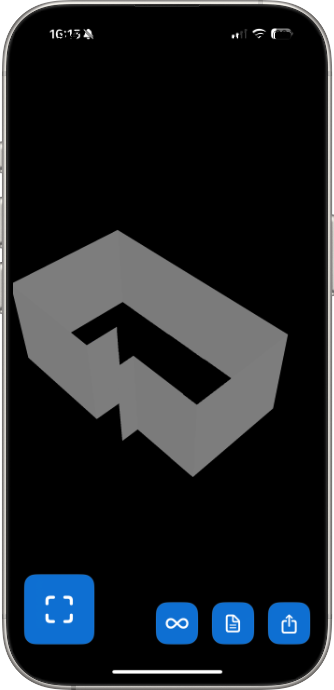
Understanding the technology is interesting, but what matters is what it lets you accomplish. Here's what becomes possible when your phone can accurately measure rooms.
Measure any room in 60 seconds. Walk into a room, open a LiDAR scanning app, walk the perimeter, and you have every wall measurement captured digitally. No tape measure, no second person holding the other end, no scribbling numbers on paper. The LiDAR sensor captures the full geometry of the room as you move through it.
Create floor plans instantly. The scan data translates directly into a measured floor plan showing the room's shape and dimensions. Apps like ezSpace generate this floor plan automatically from the LiDAR data. Export it as a PDF and you have a professional-looking document ready to print, email, or reference on your phone.
Export to multiple formats. Different situations call for different file types. A PDF works for printing and sharing. An SVG gives you scalable vectors for design software and CAD applications. USDZ and OBJ provide 3D models for augmented reality viewing and 3D rendering software. JSON preserves the raw data for custom workflows and future re-export. One scan, many outputs.
Capture room geometry for design work. Interior designers, architects, and contractors can use LiDAR scans as the starting point for their professional work. Instead of manually measuring and then manually drafting the existing room, the LiDAR scan provides the baseline geometry in a format that design software can import directly.
Document properties. Scanning every room in a house or apartment creates a complete digital record of the property. Useful for real estate listings, insurance documentation, estate records, and renovation planning. Save the scan data once and access it whenever you need it.
View rooms in augmented reality. The 3D data captured by LiDAR can be exported as AR-compatible files. Open a USDZ file on your iPhone and you can view a 3D model of the scanned room overlaid on your current environment. It's a novel way to visualize spaces and share them with others.
Let's talk honestly about what LiDAR room scanning can and can't deliver in terms of accuracy.
For most practical purposes, it's very good. The LiDAR sensor on iPhone and iPad Pro captures distance measurements with high precision. For room-scale measurements -- walls that are typically 3 to 30 feet long -- the results are accurate enough for furniture planning, renovation estimates, real estate listings, contractor quotes, and insurance documentation. These are the use cases where most people need room measurements, and LiDAR handles them well.
It's not a substitute for professional surveying. If you're submitting measurements to a building department, doing structural engineering calculations, or creating legally binding property surveys, LiDAR phone scanning is not the right tool. Professional surveys require certified equipment, licensed surveyors, and a level of precision and legal standing that consumer devices aren't designed to provide.
Factors that affect accuracy. Several things can influence how precise your scan turns out:
Distance to surfaces. LiDAR is most accurate at shorter ranges. Walls that are 5-15 feet away get very precise readings. Very large rooms -- gymnasium-sized spaces or open-plan areas spanning 40+ feet -- may see slightly reduced accuracy at the far edges.
Surface material. Most wall surfaces -- drywall, wood, brick, concrete, tile -- reflect infrared light predictably and produce clean measurements. Highly reflective surfaces like mirrors and polished glass can cause unusual reflections. Very dark, matte-black surfaces absorb more infrared light and may return weaker signals.
Scanning technique. Slow, steady movement produces better results than rushing. Pointing the device directly at wall surfaces gives cleaner readings than scanning at extreme angles. These are small factors, but they add up when precision matters.
Environmental conditions. Bright sunlight contains infrared radiation that can occasionally interfere with the LiDAR sensor in outdoor environments. For indoor room scanning, this is rarely a factor since walls block most direct sunlight. Artificial indoor lighting has no effect on LiDAR performance.
The bottom line: For the vast majority of room measurement tasks -- everything short of professional surveying -- LiDAR room scanning on iPhone and iPad provides measurements you can confidently rely on.
LiDAR on consumer devices is still a relatively young technology. Apple introduced it to the iPad Pro in 2020 and the iPhone Pro line shortly after. In just a few years, it's already transformed how people measure and document physical spaces.
Hardware improvements. Each generation of LiDAR sensors gets faster and more precise. The range increases, the resolution improves, and the sensor itself gets smaller and more power-efficient. Future devices will likely capture denser point clouds in less time, enabling even more detailed room geometry.
Software gets smarter. As more developers build on LiDAR data, the software that processes raw scans into useful outputs continues to improve. Better algorithms mean cleaner wall detection, more accurate corner identification, and smarter handling of complex room shapes. The same hardware produces increasingly better results as the software matures.
Broader device availability. Currently, LiDAR is limited to Apple's Pro-tier devices. As the technology becomes cheaper to manufacture, it may eventually appear in standard iPhone and iPad models, Android devices, and other consumer electronics. Wider availability means more people scanning rooms, which drives further software development and use case expansion.
Integration with spatial computing. Apple's investment in spatial computing -- including Vision Pro and ARKit -- ties directly into LiDAR's capabilities. Room scanning is a foundational technology for mixed reality experiences, where digital content needs to understand and interact with physical spaces accurately. The room scanning you do today with apps like ezSpace is powered by the same underlying technology that enables Apple's broader spatial computing vision.
What this means for you today. If you have a LiDAR-equipped iPhone or iPad, you already have access to room measurement capabilities that were unavailable to consumers just a few years ago. The technology works well now, and it's only getting better. Whether you need to measure a room for furniture shopping, create a floor plan for a renovation, or export room geometry for professional design work, LiDAR scanning on your phone is a practical, reliable tool that's ready to use right now.

ezSpace is a LiDAR room scanning app built by Merano Studio. Here's what it does with the LiDAR sensor on your iPhone or iPad.
Real-time scanning with live feedback. When you scan a room, ezSpace shows you exactly what the LiDAR sensor is capturing as it happens. Walls outline themselves on your screen in real time, with visual indicators for corner detection and wall boundaries. You always know what's been captured and what still needs your attention. There's no guessing whether the scan is complete -- the app shows you.
Six export formats. One scan produces six possible outputs. PDF for printable floor plans. SVG for scalable vector graphics compatible with CAD and design software. USDZ for augmented reality viewing on Apple devices. OBJ for universal 3D model import. Reality for Apple's RealityKit framework. JSON for raw data preservation and custom workflows.
Re-export from saved data. Export a JSON file and you can reopen it in ezSpace anytime to convert it to a different format. Scanned a room and exported a PDF last month? Open the JSON and export an SVG now -- no re-scanning needed.
Standard iOS sharing. Every export goes through the iOS share sheet. AirDrop, email, Messages, Files, iCloud Drive, and every other app that supports sharing. No proprietary accounts, no cloud services to sign up for, no platform lock-in.
Available in 23 languages. ezSpace supports Arabic, Danish, Dutch, English, Finnish, French, German, Greek, Hindi, Hungarian, Italian, Japanese, Korean, Norwegian, Polish, Portuguese (both Brazilian and European), Romanian, Spanish, Swedish, Thai, Turkish, and Ukrainian.
The app is free on the App Store and requires an iPhone Pro (12 Pro or later) or iPad Pro (2020 or later) with LiDAR.
See what your iPhone's LiDAR can really do.